


BILL Spend & Expense (Divvy)
4.5555.00 Reviews
App Specs
- Version
- 4.0.17
- Updated On
- License
- Free
- Downloads
- 100,000+
- Developer
- Bill.com Inc.
- Categories
- Business
- Platform
- Android
Screenshots
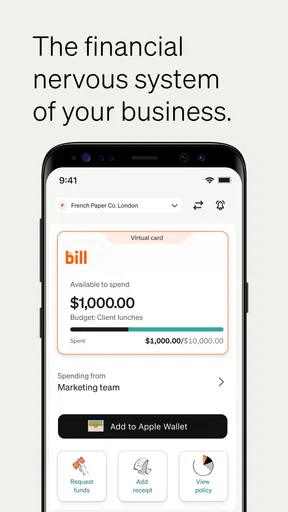
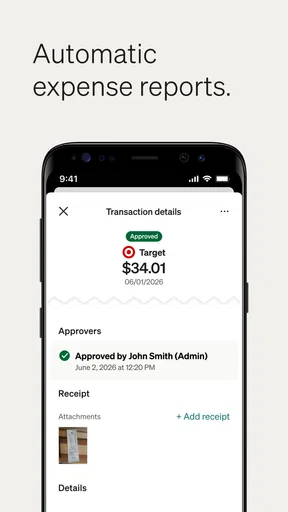
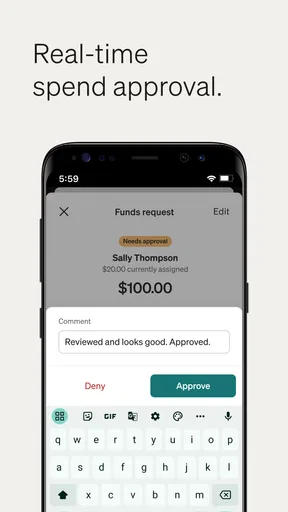
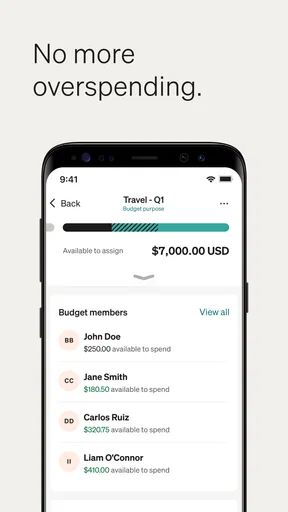
 Analysis by AppCompare
When I first opened BILL Spend & Expense, I understood its appeal quickly: it is built for businesses that need corporate card spending and expense management in the same place. That sounds simple, but the distinction matters. This is not a personal budgeting app for tracking coffee and rent. It is a work-focused tool for giving employees a clearer way to handle business purchases while helping the company keep an eye on spending.
The app comes from Bill.com Inc. and sits in the business category. It is free to download, carries an Everyone age rating, and has reached over 100 thousand installs. Its average score is 4.5 from around 4.3 thousand ratings, with more than 500 reviews. Those figures suggest that it has found a useful audience, although I would still judge it by whether its workflow fits your company rather than by the score alone.
My overall impression is positive, especially for a small or growing team that wants less back-and-forth around receipts and card purchases. The strongest part is the connection between spending and the records that explain it. The weaker part is that the app makes the most sense when an organization has already decided how employees should use corporate cards and how expenses should be reviewed. It is not a magic replacement for a company policy.
What to expect before you start
The short description presents BILL Spend & Expense as a corporate card and expense management app, and that is the right way to approach it. You should expect a work account rather than a casual sign-up experience. The app is useful when your company has an organized spending process and you are joining that process as an employee, manager, or administrator.
That also explains why the first screen may feel less immediately familiar than a consumer finance app. A personal expense tracker usually begins with your own categories and balances. Here, your role in the business matters. What you can see and do depends on how your organization has arranged its spending workflow. I found it helpful to think of the app as a shared workplace tool: the cardholder records the purchase, the business gets context, and the person responsible for review can act on it.
For a first-time user, the most important expectation is that the app is not only about looking at transactions. The useful result is a complete business purchase record. That normally means knowing what was bought, why it was bought, and which supporting details belong with it. If you open the app only to check a balance, you will miss much of its value.
The app is also a better fit for teams than for someone who simply wants to monitor personal spending. If your goal is household budgeting, bill reminders, or a private spending diary, a dedicated personal finance app will probably feel more natural. BILL Spend & Expense is aimed at the point where spending needs accountability and an organization needs a consistent trail.
Worth Reading Before You Choose

EA SPORTS FC Mobile 26 Is a Bigger Football Game, but It Takes Time

Flipboard Shows What News Apps Must Do Beyond the Feed

Switching to Android Auto Means Rethinking Your Driving Routine

Google Calendar Makes a Crowded Week Easier to Manage

Ludo King Makes the Most of the Minutes Between Plans

Baby Panda World Brings Quick Play to Modern Phones, but Its Game Library Feels Busy
Who will get the most from it
I would put this app on the shortlist for a business that gives employees cards for travel, supplies, client work, subscriptions, or other approved purchases. It can also make sense for a manager who wants employees to provide expense context without relying entirely on email, paper receipts, or scattered spreadsheets.
It is particularly useful when several people spend on behalf of one company. A shared process is easier to maintain than asking every employee to invent a personal method for recording purchases. The app gives the team a common place to work, which can reduce the familiar problem of trying to reconstruct a purchase weeks later.
I would be more cautious if you are a sole trader with only occasional expenses, or if your company already has a deeply integrated accounting workflow that employees understand well. Adding another app is not automatically an improvement. The benefit appears when the app removes a real point of friction, such as missing receipts, unclear purchase explanations, or slow expense follow-up.
Getting through the first setup
The smoothest start is to have your work details ready before opening the app. I would make sure I know which company account I am expected to use, whether I am joining as a cardholder or reviewer, and where the first business purchase is likely to come from. This preparation is more valuable than rushing through the opening screens because business apps often depend on the organization’s setup.
After installing it, I would treat the first session as an orientation rather than trying to explore every area at once. Look for the place where your spending activity appears, then identify how a purchase is opened and where its supporting information belongs. The goal is to understand the path from a transaction to a finished expense record.
One practical tip is to use a real, low-complexity business purchase for your first test. A straightforward office supply or routine work purchase is easier to understand than a shared meal, a travel booking, or a transaction with several people involved. Starting with an uncomplicated example lets you learn the structure without also solving an accounting puzzle.
I would also decide on a personal habit immediately: handle the expense close to the time of purchase. Waiting until the end of the week makes it harder to remember the purpose of a transaction, especially when several purchases look similar. The app can organize information, but it cannot reliably recreate your memory after the fact.
The first meaningful success
For me, the first successful action would not be merely signing in. It would be taking one business card transaction and turning it into a clear, reviewable record. Open the relevant purchase, add the information your company expects, attach the receipt or other supporting material when appropriate, and check the result before moving on.
This small exercise teaches more than browsing through menus. You learn where the transaction appears, how the app expects you to add context, and what a completed expense looks like from your side. It also reveals whether your company’s instructions are clear. If you are unsure which category, note, or supporting detail to use, that is a policy question worth resolving early rather than guessing repeatedly.
A realistic example would be an employee buying presentation materials on a company card before a client meeting. Instead of leaving the transaction as an unexplained line, the employee can use the app to connect the purchase with its work purpose and supporting receipt. Later, a manager does not have to ask, “What was this for?” in a separate message. That is the kind of small improvement that becomes meaningful across many employees and many purchases.
Another useful workflow is to make the app part of the purchase routine. I would keep the receipt available until the transaction is properly documented, then complete the record while the details are fresh. This is more reliable than treating expense management as a monthly cleanup job. The latter approach usually creates a pile of ambiguous transactions and makes the process feel much more difficult than it needs to be.
Why the workflow is better than a spreadsheet
A spreadsheet can be flexible, familiar, and inexpensive, but it usually depends on employees entering information consistently and sending receipts through another channel. That separation creates opportunities for mismatched dates, missing explanations, and duplicate work. BILL Spend & Expense is more focused on keeping the spending event and its business context together.
Email has a similar weakness. An employee can send a receipt to a manager, but the message may be buried, forwarded, or separated from the corresponding transaction. A dedicated expense workflow gives the organization a clearer place to look. I would not claim that it removes every administrative task, but it can make the responsibility more visible.
Compared with a general personal finance app, this tool is also more appropriate for company-owned spending. Personal finance apps are designed around an individual’s financial picture; this one is designed around business purchases and organizational review. That difference is important if several people need to understand the same transaction.
On the other hand, a full accounting platform may remain the better choice for a company that needs broad bookkeeping, invoicing, payroll, or detailed financial reporting in one system. BILL Spend & Expense is strongest at the spending and expense-management layer. I would use it to improve that part of the process, not assume it replaces every finance tool a business may need.
Common points of confusion
The first likely confusion is the difference between a card transaction and a completed expense record. Seeing a purchase in the app does not necessarily mean the administrative work is finished. A transaction is the financial event; the expense record adds the explanation and supporting details that help the business understand it.
That distinction is easy to overlook because users naturally assume that a card purchase should already contain everything needed. In practice, the person who made the purchase often knows details that do not appear in a basic transaction line. My advice is to open each unfamiliar purchase and ask whether another person in the company could understand it without contacting you.
A second source of friction is responsibility. Employees may wonder whether they should document a purchase immediately, while managers may assume the employee has already completed it. The app can support the workflow, but the company still needs to make ownership clear. If your team has not agreed on who adds context, who reviews it, and when it should be done, the software will not solve that ambiguity by itself.
There can also be confusion around unusual purchases. A meal involving several colleagues, a mixed personal and business order, or a subscription used by multiple departments may require more explanation than a simple office purchase. I would not try to force every complicated case into the same quick routine. Use a clear note and follow your organization’s instructions rather than assuming the app’s basic flow answers every policy question.
Another practical issue is timing. If a transaction does not appear exactly when you expect, repeatedly refreshing the screen may not answer the real question. It may be better to check whether you are looking at the right account or role, then ask the company administrator if the purchase should be visible. This is one reason I would test the app with a normal, easily identifiable transaction before relying on it for a time-sensitive expense.
Limitations worth considering
The app’s business focus is both its strength and its limitation. A new employee may find the experience less self-explanatory than a consumer app because the organization’s structure affects what happens next. That is not necessarily poor design, but it means the best experience depends on clear internal instructions.
There is also a behavioral limitation: no expense tool can make receipts appear after they have been lost, and no interface can know the business purpose of a vague purchase without input from the cardholder. If your team does not build a habit of documenting purchases promptly, the app may become another place where incomplete information accumulates.
I would also avoid choosing it solely because it is free to download. Download cost is not the same as the total cost of adopting a business process. Your company still needs time for setup, employee guidance, review routines, and decisions about how the records fit with its other financial tools. The app can reduce friction, but adoption requires agreement.
Finally, the usefulness of a corporate card and expense app depends on the company’s scale and needs. A very small operation with only a handful of purchases may prefer a simpler method. A larger organization with complex approval rules may need to evaluate how this workflow fits its existing controls before rolling it out broadly.
Making the second week easier
Once the first transaction is complete, I would focus on consistency rather than discovering every possible function. Use the same moment in your routine to review purchases, such as after returning from a work errand or at the end of the business day. A predictable habit is more valuable than an ambitious system that employees abandon.
For managers, the useful next step is to look for patterns in incomplete or unclear expenses. If the same kind of purchase repeatedly needs clarification, the problem may be the company’s instructions rather than the employee. A short internal example can help: show what a good description looks like for travel, supplies, meals, or recurring services. This turns the app into part of a better process instead of merely a place to chase missing information.
For employees, I recommend separating “I recognize this purchase” from “this purchase is documented well.” Recognition is personal; documentation is for the next person who needs to review it. That mindset leads to better notes and fewer follow-up questions. It is one of the less obvious benefits of using a shared business tool: you start writing for a colleague, not just for yourself.
If you handle purchases for more than one purpose, take an extra moment to make the distinction clear. A vague label may be enough for your memory today but not enough for a manager reviewing it later. The best record is concise, specific, and tied to the work reason for the purchase. That is a small discipline, but it is where much of the app’s practical value comes from.
The current version is 4.0.17, and the listed minimum operating system is iOS 12. Before deploying it across a team, I would still check the devices employees actually use and confirm that everyone can access the intended account. A business workflow is only useful when the people who need it can participate without avoidable device or account problems.
Who should skip it
I would skip this app if you are looking for a private spending tracker, a household budget, or a general-purpose accounting package. Its corporate card and expense focus will feel unnecessarily formal for those jobs. I would also hesitate if your business has no clear owner for expense review, because the app may expose disorganization without fixing its cause.
A company with a mature financial system should compare the benefit of adding a specialized spending workflow against the effort of maintaining another tool. If employees already record purchases cleanly and managers can review them efficiently, the change may not be worthwhile. The best reason to adopt this app is a specific problem that you can describe, such as delayed receipts or unclear corporate-card usage.
My recommendation after using the workflow
I see BILL Spend & Expense as a practical business app for teams that want corporate spending to be easier to document and review. Its free price and Everyone rating make it approachable at the download stage, while its strong 4.5 average suggests that many users find the concept useful. Still, the real test is not the installation screen. It is whether your company can turn the app into a shared habit.
My recommendation to a first-time user is simple: sign in with your work details, find one ordinary transaction, complete its context while the purchase is fresh, and then ask yourself whether another person could understand it without a message from you. If the answer is yes, you have reached the first meaningful success. Repeat that process consistently before exploring more advanced organizational routines.
For a small team replacing scattered receipts and spreadsheets, this can be a sensible step forward. For a personal user or a business seeking an all-in-one accounting system, I would choose something more closely matched to that job. The app earns its place when it connects company spending with timely, understandable expense records. That is a narrower promise than managing every part of business finance, but within that lane, I found it focused and genuinely useful.
Pros
- Real-time card controls help limit unauthorized or unnecessary spending.
- Automated receipt matching reduces manual expense-report preparation.
- Custom spending limits can be tailored to teams
- projects
- or employees.
- Approval workflows improve visibility before purchases are finalized.
- Useful reporting tools help identify spending trends and policy issues.
Cons
- Some advanced features may require a paid plan or administrator setup.
- The app can feel complex for freelancers or very small teams.
- Expense syncing may be delayed when transactions are still pending.
- Employees may need training to follow customized approval workflows.
- Support and account setup can depend on your company’s subscription tier.
FAQs for BILL Spend & Expense (Divvy)
What is BILL Spend & Expense (Divvy), and who is it designed for?
BILL Spend & Expense, formerly known as Divvy, is a business spending and expense-management platform designed for companies, finance teams, and employees. It combines corporate cards, budgets, approval workflows, receipt collection, and expense reporting in one system. It is generally more useful for organizations managing employee purchases than for individuals seeking a personal budgeting or expense-tracking app.
Can employees use the app to submit receipts and track business expenses?
Yes. Employees can typically use the mobile app to record business purchases, upload or photograph receipts, add expense details, and review transactions associated with their company card or assigned budget. Depending on the organization’s configuration, the app may also send reminders for missing receipts or incomplete information. Available actions can vary according to company policies, user permissions, and the connected BILL account.
Does BILL Spend & Expense include corporate cards and spending limits?
The platform is built around business spending controls and may include corporate card functionality, employee budgets, merchant restrictions, approval rules, and real-time visibility into transactions. Administrators can use these tools to establish spending limits and monitor activity, while employees can view relevant balances or available funds. Exact card availability, features, and limits depend on the company’s plan, eligibility, and account setup.
Is BILL Spend & Expense free to download and use?
Downloading the mobile application may be free, but access to its main features generally depends on an organization having an eligible BILL Spend & Expense account or subscription. Employees usually receive access through their employer rather than purchasing the service individually. Companies may be charged according to their agreement with BILL, and additional costs or eligibility requirements can apply to card programs and other services.
Is my financial and business information secure in the app?
BILL Spend & Expense handles sensitive information such as transaction data, receipts, employee details, and company spending records, so security is an important consideration. The service uses account authentication and organizational permissions to help control access, while card and transaction protections may also be available. Users should still enable strong login security, protect their devices, and review their company’s privacy and security policies before using the app.


